Three global indices
Access the S&P 500, UK100 and Japan 225 within one EA.
ONE EA. MULTIPLE MARKETS. GLOBAL OPPORTUNITY.

Six independent trading strategies across three major global indices,
managed through a single MetaTrader 5 chart.
3 GLOBAL INDICESUS, UK and Japan
6 INDEPENDENT STRATEGIESSeparate signals and rules
RISK MANAGEMENTSettings to suit your approach
ONE MT5 CHARTMulti-market operation
Three international index markets.
One carefully structured trading system.
Bartels Global Index Trader is a multi-strategy Expert Advisor for MetaTrader 5, designed to trade the S&P 500, UK100 and Japan 225 from a single chart.
Six independent strategies use their own signals, entry and exit rules, and position tracking. MT5 automates execution according to the EA’s configured rules.
Explore how it works →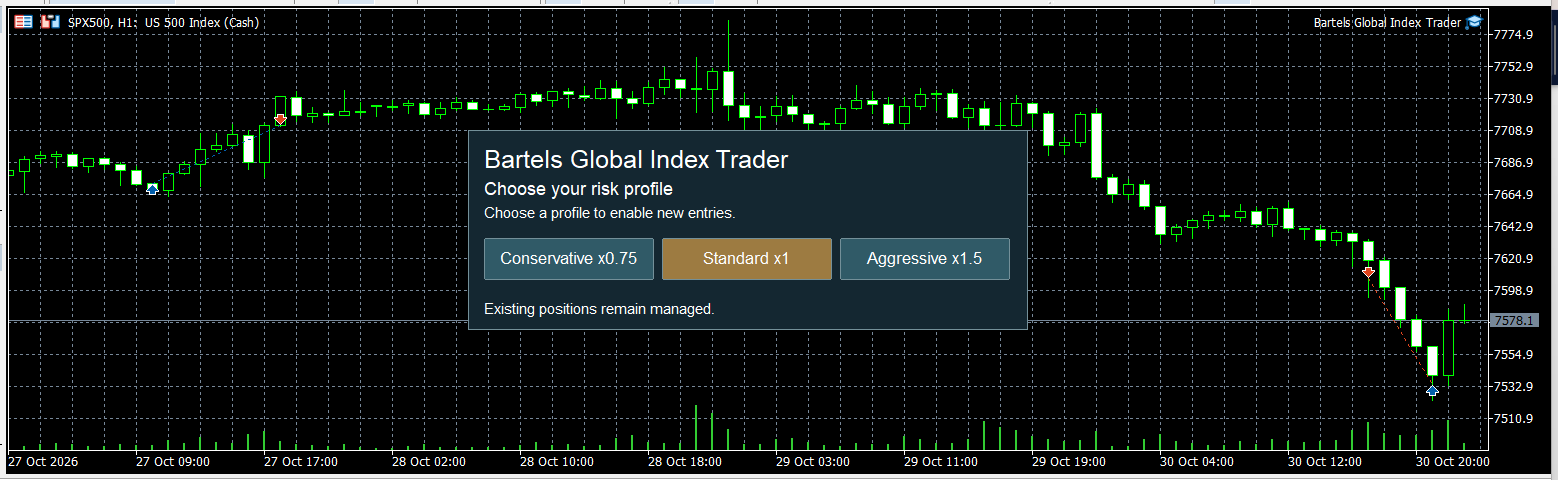
Independent logic. Centralised operation.
Six separately tracked strategies across the UK, US and Japan—managed through one MetaTrader 5 Expert Advisor.
Six local names. An international outlook.
Default index configuration shown. Broker symbol names may vary. Configurable symbols and chart-symbol fallback are available.
2024, 2025 and 2026 YTD backtests.
Backtests are hypothetical and subject to modelling limitations, spreads, slippage and testing assumptions. Past performance does not predict future results. Trading leveraged indices involves a high risk of loss. Read the trading risk disclosure ↗
A practical toolkit for a disciplined approach.
You remain responsible for your trading decisions.
Access the S&P 500, UK100 and Japan 225 within one EA.
Separate signals, entry and exit rules, and position tracking.
Execute the configured trading rules through MetaTrader 5.
Choose a Conservative, Standard or Aggressive risk profile to suit your approach. Trading risk remains.
Manage the three supported index markets from one MT5 chart.
Installation guidance and a direct way to contact the developer.
Use an MT5 account with the required index symbols, a minimum deposit of US$1,000 and account leverage of 1:100.
Add the EA, attach it to one chart and follow the approved settings and symbol guide.
Follow the activation instructions for your purchase or rental. For a 30-day trial enquiry, contact the developer using the form below.
The EA follows its rules. Keep MT5 connected and review positions, risk settings and terminal logs.
Get to know Bartels Global Index Trader before making a purchase.
Review how the EA operates, confirm your broker’s symbols and familiarise yourself with the risk settings. Start on a demo trading account while you assess suitability.
Purchase or rent through MQL5 Market.Buy Now and Rent open the product listing in a new tab. Payment and Market product delivery are handled by MQL5.
US$199Introductory Price
Standard Price US$349
Review the current price, rental options and licence terms on the MQL5 product listing before purchasing.
Request your free 30-day trial.
Apply for an account-bound trial on one demo or live MT5 account. Your trial runs for up to 30 days from first activation, ending no later than 15 December 2026, Brisbane time.
Applications close at the end of 15 November 2026, Brisbane time. Submitting this form does not start your trial. Never share your trading or investor password.
Installation guidance for MetaTrader 5.
Contact the developer if you need help.
Open the official MQL5 product listing and use the download or installation option for your purchase or rental. Sign into the same MQL5 account in MetaTrader 5. Follow the product listing and terminal instructions.
In MT5, sign into your MQL5.community account under Tools → Options → Community. Find your Market purchase in the terminal and install it. Locate the installed EA in Navigator. Follow the terminal and product instructions.
Find the broker’s equivalents of SP500, UK100 and JPN225 in Market Watch. Default symbols are SP500, UK100 and JPN225. Broker symbol names may vary. Configurable symbols and chart-symbol fallback are available. Drag the EA from Navigator onto the specified chart.
Follow the approved activation instructions, select suitable risk settings and review the Experts log. Enable algorithmic trading only after understanding the settings and permissions. Test on a demo trading account first.
MT5 must remain running and connected for local EA execution. A suitable VPS can provide ongoing operation. Broker trading hours, terminal updates and connectivity can interrupt trading.
Independently developed in Queensland, Australia.
Inspired by a local outlook. Built around global markets.
Questions about the product, trial or setup?
Contact the developer directly.
The EA is designed for three index markets: the S&P 500 (SP500), UK100 (UK100) and Japan 225 (JPN225), using six independent strategies from one MT5 chart. Noosa and Coolum trade the US index; Buderim trades the UK index; Mudjimba, Eumundi and Peregian trade the Japan index. Configurable symbols and chart-symbol fallback are available.
No. Trading involves risk, including loss of capital. Automated execution and risk controls cannot eliminate losses. Historical testing is hypothetical and cannot establish future returns.
Apply using your email, MT5 account number and exact broker server. The trial is bound to that account and server. The trial period starts on first activation and lasts up to 30 days, ending no later than 15 December 2026 Brisbane time. Applications close on 15 November 2026 Brisbane time. Submitting an application does not activate the EA. The MQL5 free demo is a separate Strategy Tester version; it is not a 30-day live-account trial.
The minimum deposit is US$1,000 and account leverage is 1:100. The default symbols are SP500, UK100 and JPN225; broker names may vary. Confirm broker compatibility and account mode with the developer before installation or purchase.
An MT5-compatible Windows VPS can keep the terminal running. Monitor connectivity, resource use and terminal logs. Keep the EA connected to your broker and check the product instructions.
The performance section shows the supplied 2024, 2025 and 2026 YTD historical backtests, including downloadable report images. Historical backtests are simulations, not live trading results.
The purchase price is US$199. A one-month rental is available for US$30. The current licence, activation and rental terms are shown on the MQL5 product listing. Check the final checkout amount and any applicable taxes before paying. Buy Now and Rent open the MQL5 product listing, where you can review the available purchase and rental options.
The EA screen offers Conservative x0.75, Standard x1 and Aggressive x1.5 risk profiles. Read the product instructions before choosing settings. For Market purchases, use the MQL5 platform for updates and product support; you can also contact the developer for enquiries.
Contact the developer directly.
For product questions, technical support, trial enquiries or purchasing, use the form or email steve@globalindextrader.com.